B
Bystro
Order taking and analytics for restaurants

The waiter taps — the kitchen already sees it

Bystro is software for a restaurant or café: the waiter takes the order on a tablet or phone, the kitchen sees it on its screen at the same moment, guests get a pre-bill and can split it, and at the end of the month you see which waiters are fastest and what guests order most. It runs on a computer in your restaurant, and you do not need an IT person to set it up.

Try it right now, no installation needed
Restaurant code enuzww9e
Password hs6hjqnh
Open the demo sign-in
Inside is a ready-made demo restaurant with several months of order history, so you can look at the analytics too, not only at taking orders.
Demo restaurant staff — sign in as anyone
Tom1111
waiter
Emily5555
waiter
Anna2222
coordinator
David6666
coordinator
Jack3333
waiter + coordinator
Administrator12345678
admin
Go straight to a screen
If it asks for a restaurant code or PIN, enter the details above and you will land exactly where you clicked. These four links always open the demo restaurant, even if you have already created your own above. To get back to yours, choose “Log out” in the menu, then “Another restaurant” on the sign-in screen and enter your code.
ACCEPTED

The waiter enters dishes at the table

Open the table, pick the dishes — the order appears in the kitchen the same second. No paper slips to carry, no calling across the room.
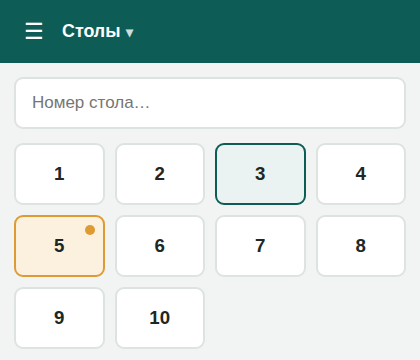
Waiter screen — list of tables
READY

The kitchen sees the queue and marks orders ready

All orders are in one list, in the order they came in. If guests add something or an order is sent back, the kitchen sees it flagged. One tap on “Ready” and the waiter hears a signal and knows the food can go out.
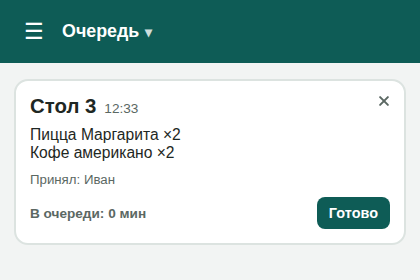
Coordinator screen — order queue
PAID

Pre-bill and split bill

The waiter prints a pre-bill on a receipt printer. If guests pay separately, the bill is split by item, and one table can have several pre-bills open at once. Payment then goes through your existing cash register.

ANALYTICS

The month in numbers

Which waiters close orders faster, which dishes sell best, how many orders went back to the kitchen, average receipt and revenue. Everything is calculated automatically, without separate reports or spreadsheets.
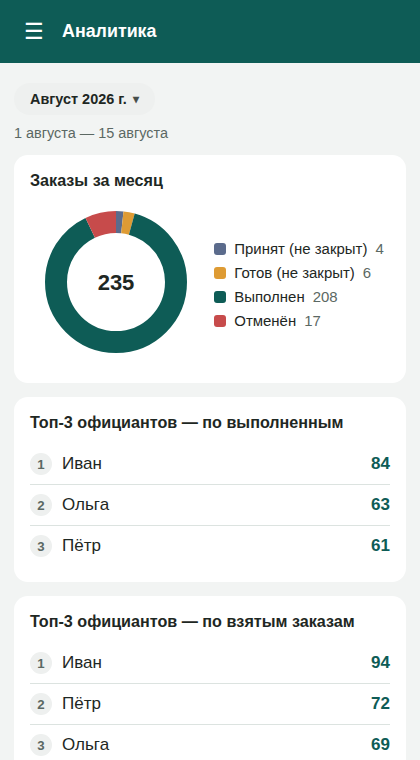
Administrator screen — analytics dashboard

What else it does

Payment history All paid receipts, grouped by table and by order — easy to see who paid for what.
Safe cancellation An order is cancelled with one tap plus a confirmation, so a stray click breaks nothing.
Three languages, your currency The interface in English, German or Russian, prices in euros, dollars or roubles.
Set up on site Menu and prices, tables, staff and their sign-in codes, the printer — all in the administrator sections, no need to call a developer.

What you need

A Windows computer An ordinary mini-PC is enough: it runs the program and keeps the whole database.
A Wi-Fi router It connects the waiters’ phones and the kitchen screen to the computer. No internet connection is needed to work.
Phones or tablets Any device with a browser — nothing to install.
Optional — a receipt printer Almost any network receipt printer works for pre-bills. Fiscal cash register integration is currently available for Russia only (ATOL); elsewhere Bystro works alongside your existing register.

Bystro does not tie your restaurant to its own ecosystem: the menu, orders and history live in an ordinary database on your computer, and the equipment is standard. If you ever decide to move to another system, everything stays with you.

Want to start right away? Create your own restaurant

  1. Create a restaurant with the button below — one click, no forms, no confirmations.
  2. Note down the code and password the system shows you — it is the only way to get back into your restaurant later.
  3. Sign in with the administrator password and enter your menu and your team under “Dishes” and “Staff”.
  4. That’s it — give the waiters their sign-in codes and start taking orders.
Create your restaurant

The demo you just opened is not a permanent setup

The trial restaurant on bystrorest.ru is there to get to know the product before moving to the local version. It differs from the local version in two ways that are worth knowing up front:

Limited in time It lasts about a month and may be deleted at any time without notice — it is a test area, not a permanent service.
No real names Instead of “Tom” or “Anna”, staff get labels like “A3”. Trial restaurant data sits on a shared server, so real staff names are deliberately not stored there.

The local version — without these limits

Works without the internet If the internet goes down, the kitchen still gets orders and the waiter still takes them.
Real staff names The whole database stays on your computer and goes nowhere — enter waiters and kitchen staff however you like.
Cannot disappear Installed once on your computer, it remains your own copy. The first three months are free, no key needed.

Ready to install the local version in your restaurant? The three-month trial is free. Download Bystro →